How to create RSS feed for a website in Rails, step by step
To add RSS feed to website output you need one small XML document listing what you published and when. Getting it right takes about an hour; getting it subtly wrong takes years to notice, because nothing complains — readers just never arrive.
RSS never went away. It quietly became the transport underneath podcast distribution, news aggregation, and every tool that watches a site for changes, and it is the only way to follow a site that does not require the site to know who you are. For anything that publishes on a schedule — a blog, a forum's announcements, a release log — a feed is a couple of dozen lines and it keeps working after the fashionable alternative is discontinued.
What follows is how to create RSS feed output that actually works: the minimum document first, then a Rails implementation, then the same thing for a static site, then the mistakes worth avoiding. The order matters — almost every broken feed is broken in the first section rather than the third.
The question is usually asked as how to create RSS feed for website content that already exists, and that is the easier half. If the site knows what it published and when, you can create RSS feed documents from the same data the pages are built from; nothing new has to be written. The harder half is deciding what belongs in an entry, which is covered further down under full text or summaries.
Two framings of the same job appear throughout. To add RSS feed to website output means emitting one more document alongside the pages and pointing at it from the head. To create RSS feed from website content that lives somewhere else — a database, a headless CMS, a folder of Markdown — means mapping that source onto the elements below, step by step. The elements are identical either way.
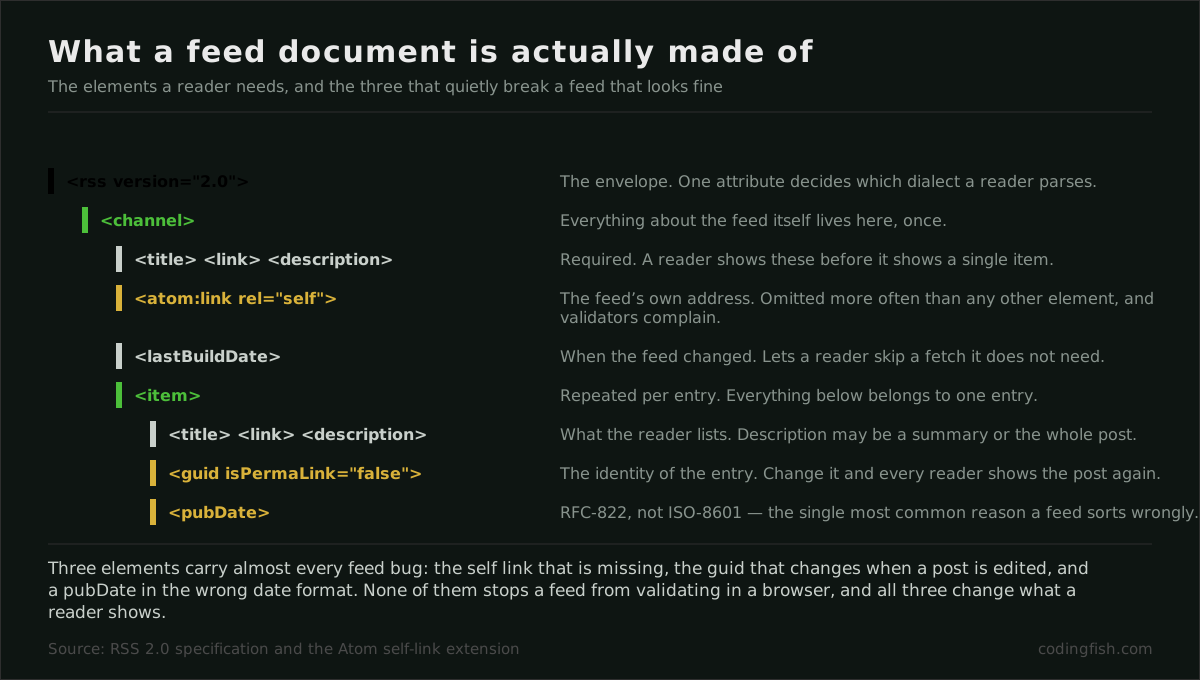
Step one — the channel, where you create RSS feed metadata
An RSS document has one channel, and the channel has three required children: a
title, a link pointing at the human-readable page the feed
represents, and a description. Everything else is optional, and most of the
optional parts are worth skipping until something asks for them.
The one optional element that earns its place immediately is atom:link with
rel="self", which states the feed's own address. Several validators warn without
it, and some aggregators use it to recognise a feed that has moved. It costs one line and one
namespace declaration on the root element.
Step two — the items
Each item needs a title, a link, and a guid. The guid is the part people get
wrong. It is not a URL requirement — it is an identity requirement. An aggregator uses it to
decide whether it has already shown this entry to the reader, so it has to be stable for the
life of the entry and unique within the feed.
Using the entry's permanent URL as the guid is fine and is what most feeds do. What is not fine is generating it from something that changes: a slug that gets edited, a title, a position in the list, or a timestamp of when the feed was rendered. Any of those makes every entry look new the next time the feed is written, and a subscriber sees the whole archive arrive again. That is the single fastest way to lose a subscriber.
The other element that matters is pubDate, and it has an unforgiving format:
RFC 822, as in Tue, 01 Sep 2026 08:00:00 +0000. An ISO 8601 timestamp looks
reasonable, validates as a string, and is silently ignored or misparsed by a good proportion
of readers. Language bindings usually have a helper for this — use it rather than a format
string you wrote from memory.
Minimum viable feed
<?xml version="1.0" encoding="UTF-8"?>
<rss version="2.0" xmlns:atom="http://www.w3.org/2005/Atom">
  <channel>
    <title>Example</title>
    <link>https://example.com/</link>
    <description>What we published, newest first.</description>
    <atom:link href="https://example.com/rss" rel="self" type="application/rss+xml"/>
    <item>
      <title>A post with a title</title>
      <link>https://example.com/a-post-with-a-title</link>
      <guid isPermaLink="true">https://example.com/a-post-with-a-title</guid>
      <pubDate>Tue, 01 Sep 2026 08:00:00 +0000</pubDate>
      <description>One or two sentences, or the whole entry.</description>
    </item>
  </channel>
</rss>
Step three — serve the feed for a website and announce it
Serve the document as application/rss+xml. Serving it as
text/html or text/plain makes some readers refuse it and makes
browsers try to render it as a page, which is how a feed ends up looking broken to the one
person who clicked the link.
Then announce it. A single line in the head of every page lets a reader's tooling find the feed without being told where it is:
<link rel="alternate" type="application/rss+xml" title="Example" href="/rss">
Pick an address and keep it. Feed subscriptions are long-lived and nobody re-subscribes; a feed that moves without a redirect loses every reader it had, silently, because their software simply stops finding new entries and they do not investigate.
How to create RSS feed output in Rails, step by step
Rails has had feed support in the box for a long time, and the idiomatic route is a builder template rather than string concatenation. Respond to the XML format in the controller, keep the query small and ordered, and let the view produce the document.
Controller and template
# app/controllers/posts_controller.rb
def index
  @posts = Post.published.order(published_at: :desc).limit(20)
  respond_to do |format|
    format.html
    format.rss { render layout: false }
  end
end

# app/views/posts/index.rss.builder
xml.instruct! :xml, version: "1.0"
xml.rss version: "2.0", "xmlns:atom" => "http://www.w3.org/2005/Atom" do
  xml.channel do
    xml.title       "Example"
    xml.link        posts_url
    xml.description "What we published, newest first."
    xml.tag! "atom:link", href: posts_url(format: :rss), rel: "self",
                          type: "application/rss+xml"

    @posts.each do |post|
      xml.item do
        xml.title       post.title
        xml.link        post_url(post)
        xml.guid        post_url(post), isPermaLink: "true"
        xml.pubDate     post.published_at.to_fs(:rfc822)
        xml.description post.summary
      end
    end
  end
end
Three details in that template are load-bearing. The URL helpers are the _url
forms rather than _path, because a feed is read away from your domain and a
relative link is useless there. The date uses the RFC 822 helper rather than a custom format.
And the query is limited and ordered, because an unbounded feed grows until it is a
multi-megabyte download that aggregators start skipping.
Add the route with defaults: { format: 'rss' } if you want the feed at a clean
address such as /rss rather than /posts.rss. Whatever you choose,
it is permanent — see the note above about feeds that move.
For a static site
A static generator has no request cycle, so the feed is simply another file produced at build time from the same source the pages come from. The logic is identical: sort by date descending, take a slice, emit the same elements.
This is the shortest route to add RSS feed to website builds that are generated rather than served: the generator already knows every page and its date, so the feed is one more template over the same list. If you would rather create RSS feed from website output after the fact — scraping your own sitemap, say — it works, and it will drift the first time a page changes without the sitemap noticing.
The one thing that changes is the failure mode. A dynamic feed is wrong for as long as the bug exists; a static feed is wrong until somebody rebuilds. If the build runs on a schedule rather than on every edit, entries appear late, and readers experience that as a site that publishes in bursts.
The other static-specific trap is the content type, because a file named without an extension
is served with whatever the web server guesses. If the feed lives at /rss with no
.xml, the server needs to be told explicitly what that path is.
Full text or summaries
Feeds can carry a summary or the entire entry. Carrying the whole thing is friendlier — the reader gets what they subscribed for without a round trip — and it costs you the page view. Carrying a summary preserves the visit and annoys anyone who subscribed precisely to avoid the site's interface.
Whichever you choose, apply it consistently. A feed for a website that alternates between full text and summaries teaches readers nothing about what to expect, and the step-by-step value of a feed is precisely that it behaves the same way every time. Decide once, at the point where you first create RSS feed output, and leave it alone.
There is no correct answer, only a consistent one. What is definitely wrong is a summary truncated mid-sentence by a character count, which reads as broken rather than brief. If the source has no summary field, take the first paragraph rather than the first 200 characters.
RSS or Atom
Atom is the other feed format, and it is the better-specified of the two: dates are ISO 8601, identifiers are explicit, and the rules about what may contain HTML are unambiguous rather than conventional. If you are choosing with no other constraint, Atom is the tidier engineering decision.
The practical answer for anyone working out how to create RSS feed for website publishing is that the format matters far less than the three elements above. Pick one, emit it correctly, and move on. Working through the elements step by step for a website of any size takes an afternoon; arguing about which specification is more elegant takes longer and changes nothing a reader will notice.
RSS wins on reach. Every reader supports it, every aggregator expects it, and podcast distribution is built on it and only on it. Publishing both is possible and mostly pointless; publishing RSS and getting the guid and the date right beats publishing Atom that nobody discovers because the link in your head element points at the other one.
Podcast feeds are this plus a namespace
A podcast feed is an RSS feed with an enclosure on each item pointing at the
audio file, plus a set of tags in Apple's namespace that the directories require. The base
document is exactly what is described above, which is why getting the fundamentals right
matters even if audio is a later idea.
The enclosure carries a URL, a byte length and a MIME type, and the byte length has to be correct — some clients use it to size the download and will truncate the file if it is wrong. That is a good example of the general rule with feeds: the format is forgiving about what you omit and unforgiving about what you state incorrectly.
When entries change after publication
Editing a published entry raises a question the format does not answer for you. Leaving the guid and the date alone means subscribers never see the correction. Changing either means the entry reappears as new, which is right for a substantial rewrite and irritating for a fixed typo.
The workable convention is to leave both untouched for small corrections, and to treat a genuine rewrite as a new entry with its own address. Deleting an entry is the one case with a clean answer: remove it from the feed and leave the page in place, because the links pointing at it are real and a feed is not an archive.
The mistakes that cost subscribers
An unstable guid, covered above, is the worst because the symptom — every entry reappearing — looks like spam to the reader and produces an unsubscribe rather than a bug report.
Unescaped markup in a description. If the description carries HTML it has to be escaped or wrapped in CDATA. An ampersand in a title is enough to make the whole document fail to parse, and a feed that fails to parse is not partially broken — it is invisible.
Future or missing dates. An entry dated in the future may be held back by some readers until that moment arrives. An entry with no date is sorted arbitrarily. Both look like the feed is empty when it is not.
A feed that requires authentication. Putting a feed behind a login means almost no reader can subscribe, because feed clients rarely carry session cookies. If the content genuinely is private, a per-user token in the URL is the usual mechanism, and it needs to be revocable.
No self-check. Run the document through a feed validator once, then subscribe to your own feed in a real reader and publish something. That last step catches everything the validator cannot, and it takes five minutes.
Questions people actually ask
What is the minimum a feed needs to work?
A channel with a title, a link and a description, then one item per entry with a title, a link, a stable identifier and a correctly formatted date. That is the whole requirement. Everything else in the specification is optional, and almost every broken feed is broken in that short list rather than in the optional part.
Why do subscribers sometimes see the whole archive again?
Because the identifier changed. If the guid is derived from a slug, a title, a position in the list or the time the feed was rendered, editing one post republishes everything to every subscriber. Nothing errors, the feed still validates, and it is the fastest way to lose a reader. Use the entry's permanent URL.
Does the date format really matter?
In RSS, yes. The specification requires RFC 822 — Tue, 08 Dec 2026 09:00:00 +0000 — and the ISO 8601 shape everyone reaches for by habit belongs to Atom. Strict readers ignore an ISO date in pubDate, which means the entry sorts by whenever that reader first happened to see it.
Is a feed still worth publishing?
It is the input to every aggregator, every newsreader and every tool that watches a site for changes, and it is the only way to follow a site that does not require the site to know who you are. For anything publishing on a schedule it is a couple of dozen lines that keep working after the fashionable alternative is discontinued.